 ☰
☰External Host Interface (EHI) Integration Guide
4. How the Integration Works
Payblr forwards EHI transaction messages to your configured endpoint using the EHI model discussed earlier.
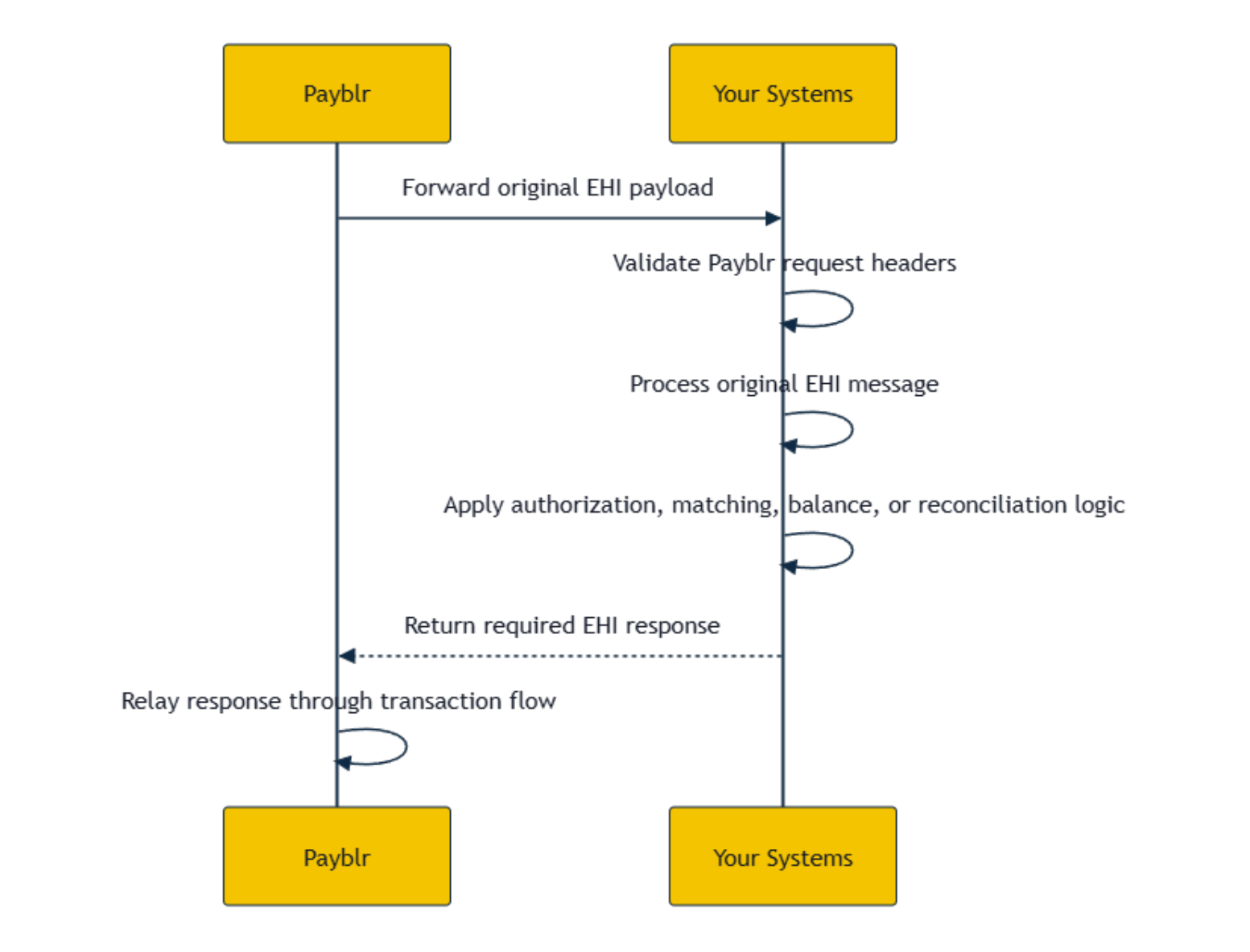
When Payblr receives an EHI message from the transaction flow, Payblr routes the message to your endpoint, signs the outbound request, and forwards the original EHI payload to your system. Your system validates the Payblr request, process the EHI message, and returns the required EHI response.
Payblr then relays your response through the transaction flow.
4.1 General flow
The general flow for EHI messages is as follows:
Payblr receives an EHI transaction message – Payblr receives the transaction message from the EHI transaction flow.
Payblr signs and forwards the outbound request – Payblr signs the request before forwarding it so your system can validate that the message came from Payblr. Payblr then sends the EHI payload to your system.
Your system validates the request – Your system validates Payblr’s signature and request timestamp before processing the transaction message.
Your system processes the EHI message – Your system processes the EHI message using the fields provided in the payload.
Your system returns the required EHI response – Your system returns the applicable response based on the message type, such as an authorization decision or acknowledgement.
Payblr relays your response – Payblr relays the response returned by your system through the transaction flow.